RADIUS Server configuration warning in RSA Authentication Manager 8.1 SP1
Originally Published: 2015-02-04
Last Modified: 2023-10-06
Article Number
Applies To
RSA Product/Service Type : Authentication Manager
RSA Version/Condition: 8.1 Service Pack 1
Platform : SUSE Enterprise Linux
O/S Version : 11 Service Pack 3
Issue
Example:
Cause
NOTE: The previous authentication manager primary and replica instance names will come across in the migration as Authentication Agents.
Resolution
- Check there are no duplicate authentication agents matching the hostname and IP address you are using to add the RADIUS client.
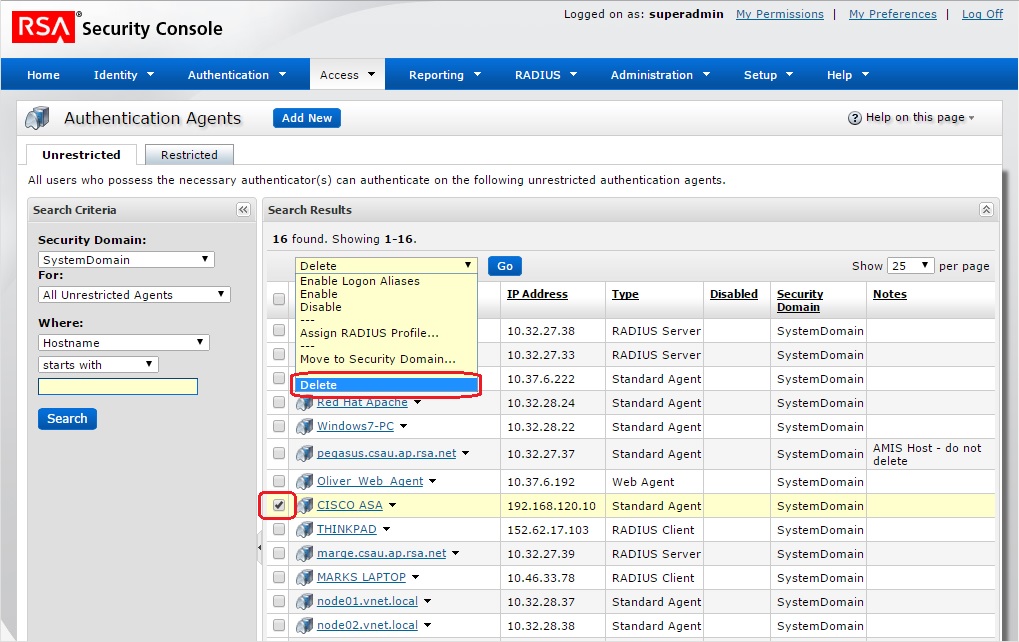
Checking Authentication Agents: Security Console > Access > Authentication Agents > Manage Existing > use the Search Criteria in the Unrestricted and Restricted tab to lookup Authentication Agents.
- Remove the duplicate authentication agent from the Security Console before attempting to add the RADIUS client again.
To delete an authentication agent after a search: check the box next to the Authentication Agent name and use the Delete option in the drop-down menu and click Go
Example:
Please contact RSA Customer Support and open a support request should you need further assistance on this matter.
Notes
| Telephone | For urgent issues use on of the telephone numbers listed at URL http://www.emc.com/support/rsa/contact/phone-numbers.htm |
| For non-urgent issues email support@rsa.com | |
| Case Management | Case Management is found at URL https://knowledge.rsasecurity.com/scolcms/mysupport.aspx (requires access to RSA SecurCare Online) |



