RSA, Identity Governance and Lifecycle - How to enable Web Service Commands
Originally Published: 2016-10-04
Article Number
Issue
Resolution
1. From the UI go to Admin -> Web Services -> locate the Web Service Command that you are looking for a particular module such as Admin, Collection, Request, Information, Review, or Rules.
2. Check if the method is listed. For example you are looking for Review module Web Service method/command called updateReviewItems for the Review module.
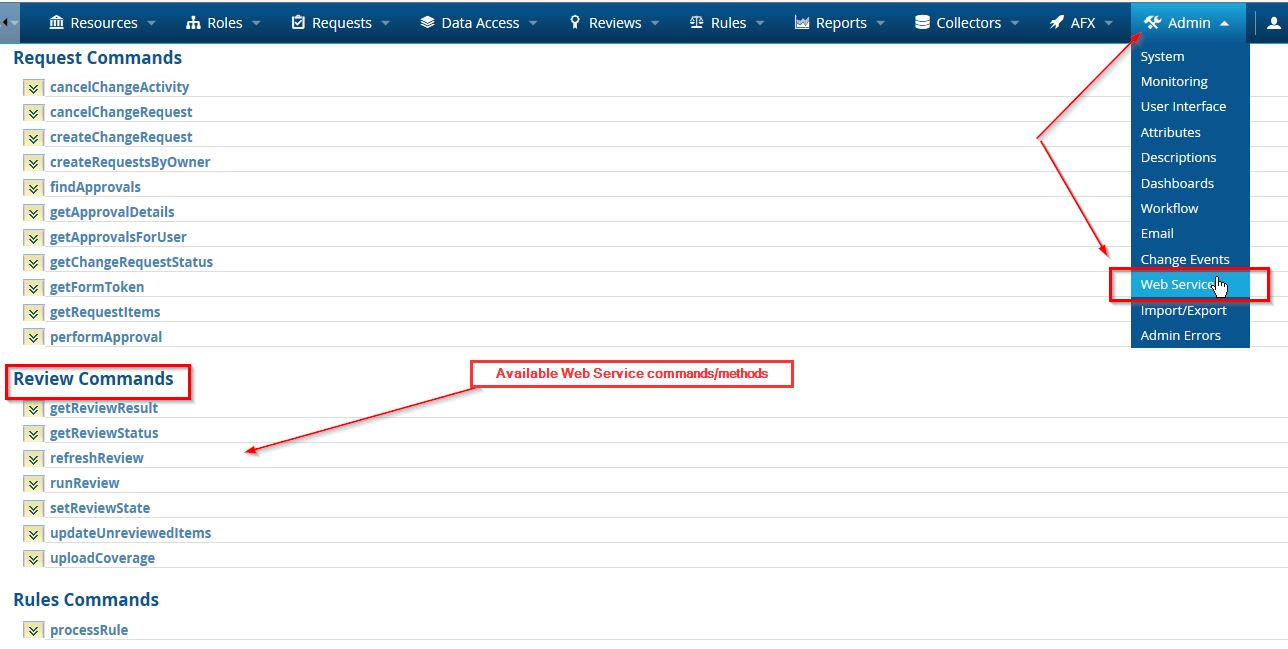
notice that the method updateReviewItems is not listed above.
3. SSH to the server as root and cd to
version (6.9.1 and earlier) /home/oracle/jboss/server/default/deploy/aveksa.ear/aveksa.war/WEB-INF/plug-ins/ReviewCommandHandler and find a file called aveksa-plug-ins.xml
(version 7.0.x) from the SSH session in the command line cd /home/oracle and type find / -name aveksa-plug-ins.xml
Note: There maybe more than one aveksa-plug-ins.xml ( you want the aveksa-plug-ins.xml). Please make a backup copy before making any changes in a different location.
4. vi to aveksa-plug-ins.xml and search for the text <command name="name of the method" enabled=
for example <command name="updateReviewItems" enabled=
5. Check to see if the enabled value is set to true or false. If false set it to true. For example
<command name="updateReviewItems" enabled=true"/>
6. If you can't find the command in the xml file you can add it to the series of commands with enabled set to true.
7. Restart the application server.
8. login to the UI and go to Admin -> Web Services and check to see if the method/command is available.
2. Check if the method is listed. For example you are looking for Review module Web Service method/command called updateReviewItems for the Review module.
notice that the method updateReviewItems is not listed above.
3. SSH to the server as root and cd to
version (6.9.1 and earlier) /home/oracle/jboss/server/default/deploy/aveksa.ear/aveksa.war/WEB-INF/plug-ins/ReviewCommandHandler and find a file called aveksa-plug-ins.xml
(version 7.0.x) from the SSH session in the command line cd /home/oracle and type find / -name aveksa-plug-ins.xml
Note: There maybe more than one aveksa-plug-ins.xml ( you want the aveksa-plug-ins.xml). Please make a backup copy before making any changes in a different location.
4. vi to aveksa-plug-ins.xml and search for the text <command name="name of the method" enabled=
for example <command name="updateReviewItems" enabled=
5. Check to see if the enabled value is set to true or false. If false set it to true. For example
<command name="updateReviewItems" enabled=true"/>
6. If you can't find the command in the xml file you can add it to the series of commands with enabled set to true.
7. Restart the application server.
8. login to the UI and go to Admin -> Web Services and check to see if the method/command is available.
Notes



