Reset the token PIN in the RSA Authentication Manager 8.x Self-Service Console when the existing PIN is forgotten
Originally Published: 2018-08-10
Last Modified: 2024-05-22
Article Number
Applies To
RSA Product/Service Type: Authentication Manager
RSA Version/Condition: 8.x
Issue
Tasks
- From the Security Console, click Setup > Self-Service Settings.
- On the Settings page, under Customization, click Enable or Disable Self-Service Features.
- Under Set Display Options for Troubleshooting, select Display I forgot my PIN option.
- Click Save.
Resolution
- Login to the Self-Service Console.
- Click on Troubleshoot.
- Click the I forgot my PIN option and click OK.
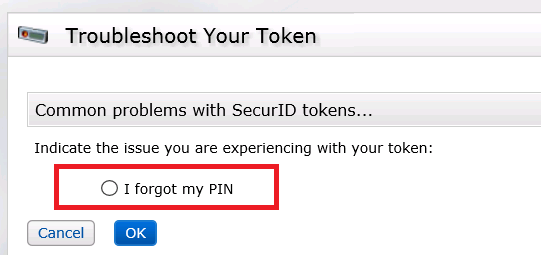
- When prompted, create and confirm the new PIN then click OK.
- Test the token and new PIN by entering your user name and passcode then click Test.
Notes
- This solution only works for RSA SecurID software and hardware tokens.
- Refer to the article on How to Set the Authentication Method for the Self-Service Console .



