Setting RADIUS attributes to use with the Telstra Next G wireless service
Originally Published: 2014-10-20
Last Modified: 2023-10-06
Article Number
Applies To
RSA Product/Service Type: Authentication Manager
RSA Version/Condition: 8.x
Platform: SUSE
Issue
Resolution
The RADIUS client configured for the Telstra Next G wireless service must have a Make / Model of 'Ascend MAX Family' in order to use the two RADIUS attributes; RADIUS attributes Ascend-Client-Primary-DNS (attribure 135) & Ascend-Client-Secondary-DNS (attribute 136).
Steps:
With an administrative account use Security Console > RADIUS > RADIUS Client > Manage Existing > Left-click Client Name and select Edit. Change the Make / Model field in RADIUS Client Settings and Save the changes.
Example:
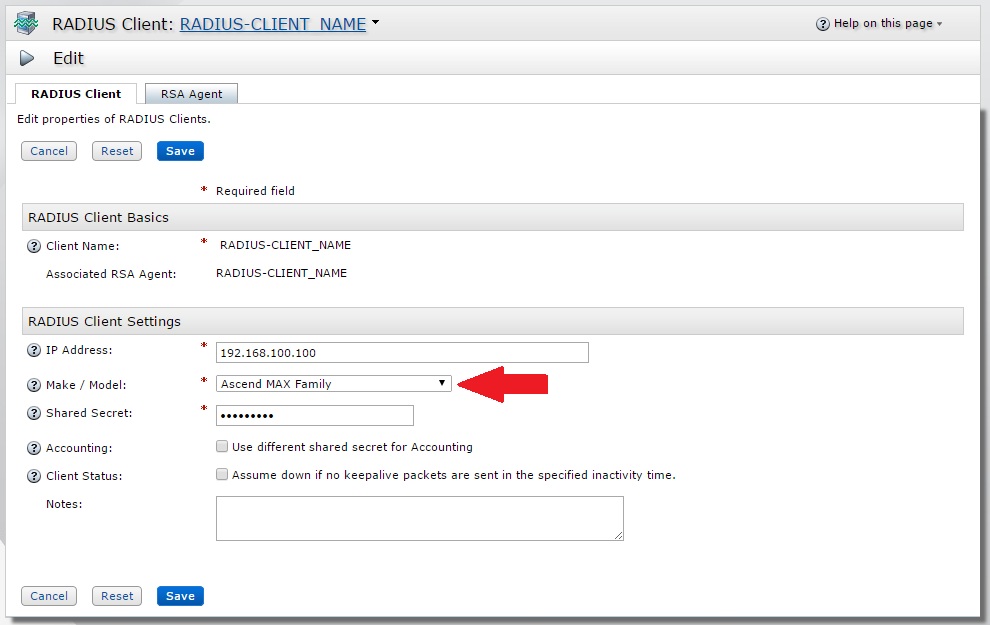
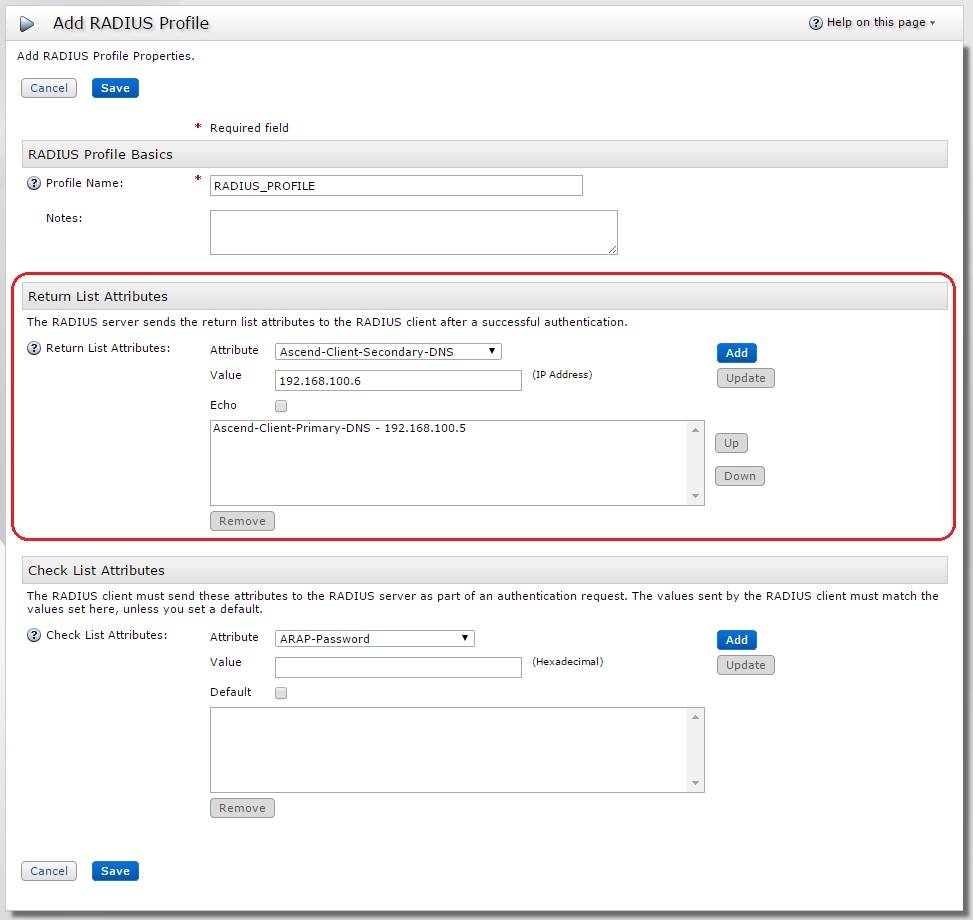
..this then allows the administrator to select Ascend-Client-Primary-DNS & Ascend-Client-Secondary-DNS RADIUS attributes from the Attribute drop-down in the Return List Attributes section of the RADIUS profile.
With an administrative account use Security Console > RADIUS > RADIUS profiles > Add New > Enter a Profile Name, select the required Attributes and click Save. Alternatively use Security Console > RADIUS > RADIUS profiles > Manage Existing > Left-click Profile Name and select Edit. Add the Ascend-Client-Primary-DNS & Ascend-Client-Secondary-DNS to the existing RADIUS Profile and click Save.
Example:
Example:
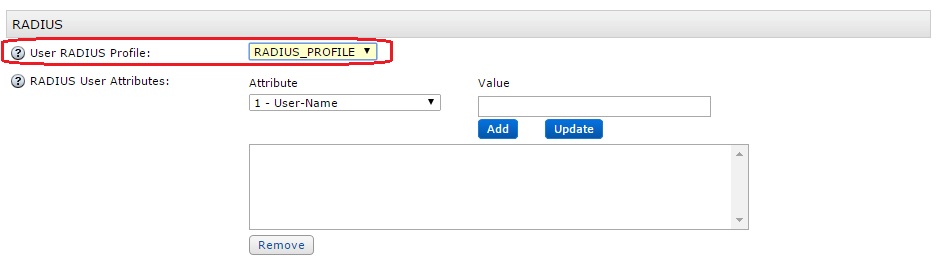
The next step is to assign the saved RADIUS profile to the end user (if not do so already) via Identity > Users > Manage Existing > use the Search Criteria to find the user > Left-click User ID and select Authentication Settings from the menu. In the RADIUS section of Authentication Settings select the RADIUS profile name using the pull-down for User RADIUS Profile and Save.
Example:
Perform RADIUS authentication tests to confirm the RADIUS attributes are being returned to the RADIUS client after a successful authentication.
Notes
Example; Authentication Request and corresponding Authentication Response for a RADIUS authentication for user 'rsatest' where RADIUS_PROFILE has been assigned:
10/20/2014 15:03:13 Authentication Request
10/20/2014 15:03:13 Received from: ip=192.168.100.81 port=56908
10/20/2014 15:03:13
10/20/2014 15:03:13 Raw Packet :
10/20/2014 15:03:13 000: 0111002f 20202020 20203134 31333737 |.../      141377|
10/20/2014 15:03:13 010: 37373933 01097273 61746573 740212f1 |7793..rsatest...|
10/20/2014 15:03:13 020: 7d96bedc 85dd0928 ea0d6a31 8cba84   |}......(..j1... |
10/20/2014 15:03:13
10/20/2014 15:03:13 -----------------------------------------------------------
10/20/2014 15:03:13 ../radauthd.c radAuthHandleRequest() 3057 Entering
10/20/2014 15:03:13 Looking up shared secret
10/20/2014 15:03:13 Looking for RAS client 192.168.100.81 in DB
10/20/2014 15:03:13 Matched 192.168.100.81 to RAS client RADIUS-CLIENT_NAME
10/20/2014 15:03:13 Parsing request
10/20/2014 15:03:13 Initializing cache entry
10/20/2014 15:03:13 Doing inventory check on request
10/20/2014 15:03:13 Getting info on requesting client
10/20/2014 15:03:13 -----------------------------------------------------------
10/20/2014 15:03:13 Authentication Request
10/20/2014 15:03:13 Received From: ip=192.168.100.81 port=56908
10/20/2014 15:03:13 Packet : Code = 0x1 ID = 0x11
10/20/2014 15:03:13 Client Name = RADIUS-CLIENT_NAME Dictionary Name = Ascend.dct
10/20/2014 15:03:13 Vector =
10/20/2014 15:03:13 000: 20202020 20203134 31333737 37373933 |      1413777793|
10/20/2014 15:03:13 Parsed Packet =
10/20/2014 15:03:13 User-Name : String Value = rsatest
10/20/2014 15:03:13 User-Password : Value =
10/20/2014 15:03:13 000: f17d96be dc85dd09 28ea0d6a 318cba84 |.}......(..j1...|
10/20/2014 15:03:13 -----------------------------------------------------------
10/20/2014 15:03:13 Determining user class
10/20/2014 15:03:13 Authenticating user rsatest with authentication method SecurID
10/20/2014 15:03:13 Beginning instance of SecurID authentication
10/20/2014 15:03:13 Performing SecurID user authentication for DEFAULT (rsatest)
10/20/2014 15:03:15 SecurID profile RADIUS_PROFILE for user rsatest success
10/20/2014 15:03:15 SecurID authentication for user rsatest success
10/20/2014 15:03:15 Terminated instance of SecurID authentication
10/20/2014 15:03:15 Determined that rsatest authenticated by plug-in module is the user
10/20/2014 15:03:15 Getting profile info for requesting user
10/20/2014 15:03:15 Merging saved attributes with user info
10/20/2014 15:03:15 Merging profile info with user info
10/20/2014 15:03:15 Comparing checklist items with user/profile items
10/20/2014 15:03:15 Appending echo values, if any
10/20/2014 15:03:15 User RSATEST being passed to attribute editing authentication methods
10/20/2014 15:03:15 Class subattribute: DistName : String Value = rsatest
10/20/2014 15:03:15 Class subattribute: AuthType : String Value = 18
10/20/2014 15:03:15 Class subattribute: TransactionId : Value =
10/20/2014 15:03:15 000: ce40ce52 44100c3a 00000011          |.@.RD..:....    |
10/20/2014 15:03:15 Sent accept response for user rsatest to client RADIUS-CLIENT_NAME
10/20/2014 15:03:15 -----------------------------------------------------------
10/20/2014 15:03:15 Authentication Response
10/20/2014 15:03:15 Packet : Code = 0x2 ID = 0x11
10/20/2014 15:03:15 Vector =
10/20/2014 15:03:15 000: 58a0f29f 2f8c8096 502b5788 a666e262 |X.../...P+W..f.b|
10/20/2014 15:03:15 Class : Value =
10/20/2014 15:03:15 000: 53425232 434ce790 99e59290 a08c9d80 |SBR2CL..........|
10/20/2014 15:03:15 010: 11802501 80038198 ce800280 0881b99c |..%.............|
10/20/2014 15:03:15 020: ec97a395 e6f41280 0e81e790 99e59290 |................|
10/20/2014 15:03:15 030: a08c9d80 808080c4                   |........        |
10/20/2014 15:03:15 Ascend-Client-Primary-DNS : IPAddress = 192.168.100.5
10/20/2014 15:03:15 Ascend-Client-Secondary-DNS : IPAddress = 192.168.100.6
10/20/2014 15:03:15 -----------------------------------------------------------
10/20/2014 15:03:15 -----------------------------------------------------------
10/20/2014 15:03:15 Authentication Response
10/20/2014 15:03:15 Sent to: ip=192.168.100.81 port=56908
10/20/2014 15:03:15
10/20/2014 15:03:15 Raw Packet :
10/20/2014 15:03:15 000: 0211005a 58a0f29f 2f8c8096 502b5788 |...ZX.../...P+W.|
10/20/2014 15:03:15 010: a666e262 193a5342 5232434c e79099e5 |.f.b.:SBR2CL....|
10/20/2014 15:03:15 020: 9290a08c 9d801180 25018003 8198ce80 |........%.......|
10/20/2014 15:03:15 030: 02800881 b99cec97 a395e6f4 12800e81 |................|
10/20/2014 15:03:15 040: e79099e5 9290a08c 9d808080 80c48706 |................|
10/20/2014 15:03:15 050: c0a86405 8806c0a8 6406              |..d.....d.      |
10/20/2014 15:03:15
10/20/2014 15:03:15 -----------------------------------------------------------
10/20/2014 15:03:15 Packet containing 90 bytes successfully sent



