Adding a new Vanguard RADIUS dictionary file to RSA Authentication Manager 8.x
Originally Published: 2017-08-07
Last Modified: 2023-10-06
Article Number
Applies To
RSA Product/Service Type: Authentication Manager
RSA Version/Condition: 8.x
Issue
Resolution
Procedure for adding the Vanguard RADIUS dictionary file
IMPORTANT : These steps must be performed on every Authentication Manager instance in the deployment and included in any disaster recovery plan as it is a custom update to the RSA RADIUS.
- Copy the Vanguard RADIUS dictionary file called vg.dct into /opt/rsa/am/radius. The contents of vg.dct are as follows.
################################################################################
# vg.dct - Vanguard Dictionary
#
# (See README.DCT for more details on the format of this file)
################################################################################
#
# Use the Radius specification attributes
#
@radius.dct
#

MACRO VANGUARD_VSA(t,s) 26 [vid=449 type1=%t% len1=+2 data=%s%]
ATTRIBUTE Codex-UM-AuthPrivilege  VANGUARD_VSA(200,integer) r
ATTRIBUTE Codex-UM-AuthUserGroup  VANGUARD_VSA(201,string) r
ATTRIBUTE Codex-UM-LogMenu  VANGUARD_VSA(202,string) r
ATTRIBUTE Codex-UM-LogApplication  VANGUARD_VSA(203,string) r
ATTRIBUTE Codex-UM-LogRecordName  VANGUARD_VSA(204,string) r
ATTRIBUTE Codex-UM-LogRecordValue  VANGUARD_VSA(205,string) r
ATTRIBUTE Codex-UM-LogAlarm  VANGUARD_VSA(206,string) r

VALUE Codex-UM-AuthPrivilege  AccessEngineering 13
VALUE Codex-UM-AuthPrivilege  AccessService 11
VALUE Codex-UM-AuthPrivilege  AccessRestricted 5
VALUE Codex-UM-AuthPrivilege  AccessMedium 4
VALUE Codex-UM-AuthPrivilege  AccessUserPlus 3
VALUE Codex-UM-AuthPrivilege  AccessUserDiag 2
VALUE Codex-UM-AuthPrivilege  AccessFree 1

################################################################################
# VG.dct - Vanguard Dictionary
################################################################################
- Update the vendor.ini file to have a new vendor section for the Vanguard and save the changes.
…
…
…
vendor-product       = Vanguard Router
dictionary           = vgms
ignore-ports         = no
port-number-usage    = per-port-type
help-id              = 2000

vendor-product       = Vanguard
dictionary           = vg
ignore-ports         = no
port-number-usage    = per-port-type
help-id              = 2000

vendor-product       = VPNet VPN Service Unit
dictionary           = vpnet
help-id              = 2122
…
…
…
- Update the dictiona.dcm file to include vg.dct
…
…
…
@unisphere.dct
@unisphere-4.dct
@vg.dct
@vpnet.dct
@xylan.dct

################################################################################
# dictiona.dcm
################################################################################
- The Vanguard device sends a Service-Type 8 authentication request and an additional parameter called AuthenticateOnly is required in the radius.ini, as below:
;;;;;;;;;;;;;;;;;;;;;;;;;;;;;;;;;;;;;;;;;;;;;;;;;;;;;;;;;;;;;;;;;;;;;;;;;;;;
; RADIUS.INI file - Version 6.2.3 (August 2016)
;;;;;;;;;;;;;;;;;;;;;;;;;;;;;;;;;;;;;;;;;;;;;;;;;;;;;;;;;;;;;;;;;;;;;;;;;;;;
; This file defines operational characteristics of Pulse Secure's
; Steel-Belted Radius server.

[Configuration]
StartupTimeout=600
LogLevel                        = 0
TraceLevel                      = 0
LogfilePermissions              = rsaadmin:rsaadmin 600
Apply-Login-Limits              = yes
;PrivateDir                     = <file system location>
FramedIPAddressHint             = no
CheckMessageAuthenticator       = 0
LogAccept                       = 1
LogReject                       = 1
AddSourceIPAddressAttrToRequest = 0
;AddFunkClientGroupToRequest     = 0
;ClassAttributeStyle            = 2
;LogfileMaxMBytes               = 0
;NoNullTermination              = 0
;LogHighResolutionTime          = no
;LogUsesUTC                     = no
;DisablePromptAttribute         = 0
AuthenticateOnly                = 0
- Restart the RSA RADIUS service at the command line with the following command:
rsaadmin@app82p:/opt/rsa/am/radius> /opt/rsa/am/server/rsaserv restart radius
Stopping RSA RADIUS Server: **
RSA RADIUS Server                                          [SHUTDOWN]
Starting RSA Administration Server with Operations Console:
Starting RSA Database Server: \ RSA Database Server                                        [RUNNING]                                                                *
RSA Administration Server with Operations Console          [RUNNING]
Starting RSA RADIUS Server Operations Console:
RSA RADIUS Server Operations Console                       [RUNNING]
Starting RSA Runtime Server:
RSA Runtime Server                                         [RUNNING]
Starting RSA RADIUS Server: *
RSA RADIUS Server                                          [RUNNING]
rsaadmin@app82p:/opt/rsa/am/radius
- Check that the changes took effect by looking at the RADIUS log file (named yyyymmdd.log. For example, 20170727.log. As an example, RSA RADIUS on startup notices there is a different in the RADIUS dictionary configuration (shown in bold below):
07/27/2017 10:57:39 Version: v6.23.2
07/27/2017 10:57:39 Process ID of daemon is 27004
07/27/2017 10:57:39 Private Directory set to "/opt/rsa/am/radius/"
07/27/2017 10:57:39 No administrative users found in /opt/rsa/am/radius/access.ini
07/27/2017 10:57:39 No administrative groups found in /opt/rsa/am/radius/access.ini
07/27/2017 10:57:39 *** Start Access.ini entries ***
07/27/2017 10:57:39 *** End Access.ini entries ***
07/27/2017 10:57:39 Auto-configuring server IPv4 addresses
07/27/2017 10:57:39 Configured server IP address: 192.168.31.51
07/27/2017 10:57:39 Number of dictionaries in saved file does not match number in directory
07/27/2017 10:57:39 Opening saved dictionary file
07/27/2017 10:57:39 Successfully initialized saved-dcts.bin file
07/27/2017 10:57:39 Starting dictionary file processing ...
07/27/2017 10:57:42 Writing dictionary info to saved dictionary
07/27/2017 10:57:42 Successfully wrote dictionary information to saved-dcts.bin
07/27/2017 10:57:42 Closing saved dictionary file
07/27/2017 10:57:42 Successfully created and closed saved-dcts.bin
07/27/2017 10:57:42 Concluded dictionary file processing ...
07/27/2017 10:57:42
07/27/2017 10:57:42 RSA RADIUS -- Powered by Steel-Belted Radius licenses
07/27/2017 10:57:42 license string                  additional info
07/27/2017 10:57:42 1605 4579 1200 0097 0871 8787   full license
07/27/2017 10:57:42 Features of above license key: Site license
…
…
…
- Now an administrator can create a RADIUS client for the Vanguard device using the Security Console (RADIUS > RADIUS Client > Add New). Note that it is important the Make / Model value is set to use the new RADIUS dictionary called Vanguard in this example.
To continue with this configuration the administrator would click the Save & Create Associated RSA Agent button, else the authentications from the Vanguard device will fail.
- Next, create a RADIUS profile where the Codex-UM-<name> attributes can be selected based on requirement.
For this example, a RADIUS profile will return one RADIUS attribute (Codex-UM-AuthPrivilege) with a value of AccessEngineering.
- Now assign the RADIUS profile to a user using the Authentication Settings from the context drop down menu by left-clicking the User ID in the Security Console.
- Performing a RADIUS authentication where RSA RADIUS debug has been enabled shows the incoming authentication request and the authentication response with the returned RADIUS attribute (Codex-UM-AuthPrivilege):
…
…
…
07/27/2017 11:28:38 Authentication Request
07/27/2017 11:28:38 Received from: ip=192.168.31.13 port=56910
07/27/2017 11:28:38
07/27/2017 11:28:38 Raw Packet :
07/27/2017 11:28:38 000: 0105002d 20202020 20203135 30313131 |...-      150111|
07/27/2017 11:28:38 010: 38393139 01076d62 656c6c02 12841711 |8919..mbell.....|
07/27/2017 11:28:38 020: f6b08e1c cc16f028 d28e84b3 65       |.......(....e   |
07/27/2017 11:28:38
07/27/2017 11:28:38 -----------------------------------------------------------
07/27/2017 11:28:38 ../radauthd.c radAuthHandleRequest() 3057 Entering
07/27/2017 11:28:38 Looking up shared secret

Authentication Manager (RADIUS) looks for a RADIUS client

07/27/2017 11:28:38 Looking for RAS client 192.168.31.13 in DB

A match is found in the Authentication Manager; IP address 192.168.31.13 with name VANGUARD

07/27/2017 11:28:38 Matched 192.168.31.13 to RAS client VANGUARD
07/27/2017 11:28:38 Parsing request
07/27/2017 11:28:38 Initializing cache entry
07/27/2017 11:28:38 Doing inventory check on request
07/27/2017 11:28:38 Getting info on requesting client
07/27/2017 11:28:38 -----------------------------------------------------------
07/27/2017 11:28:38 Authentication Request
07/27/2017 11:28:38 Received From: ip=192.168.31.13 port=56910
07/27/2017 11:28:38 Packet : Code = 0x1 ID = 0x5

RADIUS dictionary (vg.dct) is associated to the VANGUARD RADIUS client

07/27/2017 11:28:38 Client Name = VANGUARD Dictionary Name = vg.dct
07/27/2017 11:28:38 Vector =
07/27/2017 11:28:38 000: 20202020 20203135 30313131 38393139 |      1501118919|

RADIUS packet is parsed for the RADIUS data; e.g. User-Name, User-Password (passcode in this case)

07/27/2017 11:28:38 Parsed Packet =
07/27/2017 11:28:38 User-Name : String Value = mbell
07/27/2017 11:28:38 User-Password : Value =
07/27/2017 11:28:38 000: 841711f6 b08e1ccc 16f028d2 8e84b365 |..........(....e|
07/27/2017 11:28:38 -----------------------------------------------------------

User is determined to be SecurID

07/27/2017 11:28:38 Determining user class
07/27/2017 11:28:38 Authenticating user mbell with authentication method SecurID
07/27/2017 11:28:38 Beginning instance of SecurID authentication
07/27/2017 11:28:38 Performing SecurID user authentication for DEFAULT (mbell)

User has an associated RADIUS Profile

07/27/2017 11:28:40 SecurID profile 00994983 for user mbell success
07/27/2017 11:28:40 SecurID authentication for user mbell success
07/27/2017 11:28:40 Terminated instance of SecurID authentication
07/27/2017 11:28:40 Determined that mbell authenticated by plug-in module is the user

Authentication was successfully and the RADIUS attributes are being compiled for the authentication response

07/27/2017 11:28:40 Getting profile info for requesting user
07/27/2017 11:28:40 Merging saved attributes with user info
07/27/2017 11:28:40 Merging profile info with user info
07/27/2017 11:28:40 Comparing checklist items with user/profile items
07/27/2017 11:28:40 Appending echo values, if any
07/27/2017 11:28:40 User MBELL being passed to attribute editing authentication methods
07/27/2017 11:28:40 Class subattribute: DistName : String Value = mbell
07/27/2017 11:28:40 Class subattribute: AuthType : String Value = 18
07/27/2017 11:28:40 Class subattribute: TransactionId : Value =
07/27/2017 11:28:40 000: 5844fec3 49602928 00000079          |XD..I`)(...y    |

Authentication response sent back to the RADIUS Client called VANGUARD

NOTE: by default RSA RADIUS sends back an SBR-CLASS attribute in the authentication response

07/27/2017 11:28:40 Sent accept response for user mbell to client VANGUARD
07/27/2017 11:28:40 -----------------------------------------------------------
07/27/2017 11:28:40 Authentication Response
07/27/2017 11:28:40 Packet : Code = 0x2 ID = 0x5
07/27/2017 11:28:40 Vector =
07/27/2017 11:28:40 000: 8fd99072 6a4d5c91 bd96e902 bc3b7f39 |...rjM\......;.9|
07/27/2017 11:28:40 Class : Value =
07/27/2017 11:28:40 000: 53425232 434cac91 9fec9aa5 c0a99480 |SBR2CL..........|
07/27/2017 11:28:40 010: 11802301 80038198 ce800280 0681b6d8 |..#.............|
07/27/2017 11:28:40 020: ccd6e3b0 12800e81 ac919fec 9aa5c0a9 |................|
07/27/2017 11:28:40 030: 94808080 83e4                       |......          |
07/27/2017 11:28:40 Codex-UM-AuthPrivilege : Integer Value = 13
07/27/2017 11:28:40 -----------------------------------------------------------
07/27/2017 11:28:40 -----------------------------------------------------------
07/27/2017 11:28:40 Authentication Response
07/27/2017 11:28:40 Sent to: ip=192.168.31.13 port=56910
07/27/2017 11:28:40
07/27/2017 11:28:40 Raw Packet :
07/27/2017 11:28:40 000: 02050058 8fd99072 6a4d5c91 bd96e902 |...X...rjM\.....|
07/27/2017 11:28:40 010: bc3b7f39 19385342 5232434c ac919fec |.;.9.8SBR2CL....|
07/27/2017 11:28:40 020: 9aa5c0a9 94801180 23018003 8198ce80 |........#.......|
07/27/2017 11:28:40 030: 02800681 b6d8ccd6 e3b01280 0e81ac91 |................|
07/27/2017 11:28:40 040: 9fec9aa5 c0a99480 808083e4 1a0c0000 |................|
07/27/2017 11:28:40 050: 01c1c806 0000000d                   |........        |
07/27/2017 11:28:40
07/27/2017 11:28:40 -----------------------------------------------------------
07/27/2017 11:28:40 Packet containing 88 bytes successfully sent
07/27/2017 11:28:40 ../radauthd.c radAuthHandleRequest() 3812 Exiting
Where NTRadPing is used to test RSA RADIUS, here is the RADIUS Server reply.
NOTE: unknown-vendor 449, size 6 = “ is showing as the RADIUS dictionary does not understand the Vanguard RADIUS attribute Codex-UM-AuthPrivilege. 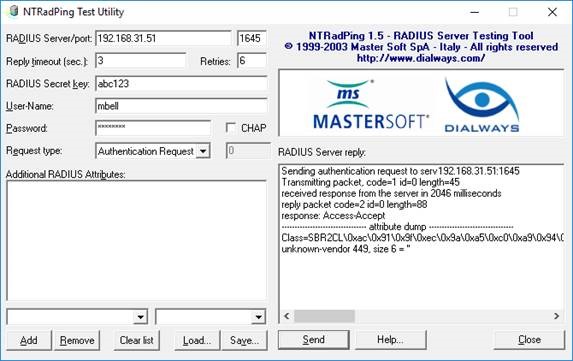
Notes
For more information see 000027797 - How to enable RADIUS debug on RSA SecuriD Appliance 3.0 and RSA Authentication Manager 8.1.
Attachments
If the attachment does not open when clicked, please refresh the page and try again. You must be logged into view the file(s).



