How to recover from "Error: The private key could not be parsed" when trying to upload the RSA SecurID Access Identity Router (IDR) SSL private key
Originally Published: 2016-09-09
Article Number
Applies To
Issue
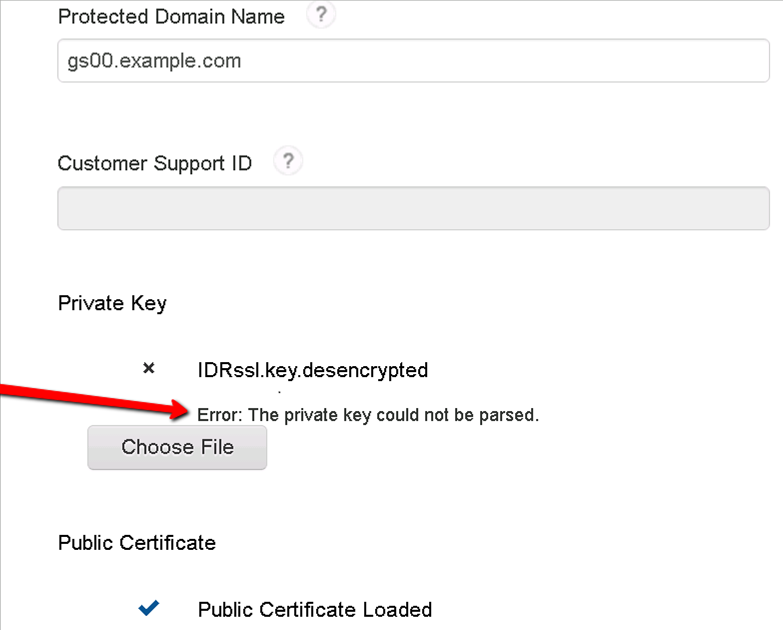
When uploading your SSL private key through the Administration Console (My Account > Company Settings > Company Information), as described in the RSA SecurID Access documentation on how to Configure Company Settings and Certificates, the following error displays:
Error: The private key could not be parsed
Cause
Resolution
You can create a temporary un-encrypted version of the protected private key using the openssl toolkit:
# openssl rsa -in <private_encrypted>.key -out <private_unencrypted>.key
Enter pass phrase for <private_encrypted>.key:
writing RSA key
After uploading the un-encrypted key via the Administration Console, it should then be deleted from your local system.
Notes
Unprotected Case
openssl rsa -text -noout -in <private_unencrypted>.key
Private-Key: (1024 bit)
modulus:
    00:d0:7f:ee:7b:50:ba:76:42:35:df:5e:d2:95:ef:
    d8:32:fe:38:ec:08:28:c6:7b:03:3c:21:ba:4b:a9:
Note that you are not prompted for a pass phrase.
Protected Case
openssl rsa -text -noout -in <private_encrypted>.key
Enter pass phrase for <private_encrypted>.key:
Note that you are prompted for a passphrase.



