Troubleshooting Web Tier deployments on Red Hat Enterprise Linux for RSA Authentication Manager 8.1
Originally Published: 2015-10-27
Article Number
Applies To
RSA Product/Service Type: Authentication Manager
RSA Version/Condition: 8.1 SP1
Issue
Offline, Reinstall Required
Resolution
Where RSA Authentication Manager 8.1 Service Pack 1 Patch 2 or later is used to update the Authentication Manager instances in the deployment, the RSA Authentication Manager 8.1 Service Pack 1 Patch 2 Web Tier software must be installed for the Web Tier deployment.
This involves uninstalling the existing Web Tier software and installing the new RSA Authentication Manager 8.1 Service Pack 1 Patch 2 web software.
Troubleshooting a Web Tier installation (on a supported Red Hat Enterprise Linux server)
Here is an example of the message displayed for a Web Tier where it is stating it is offline and a reinstall is required:The goal is to get the Web Tier online, as in the screen shot below.
The Update button is where a custom logo was added and the Web Tier is waiting for the change to be pushed to the Web Tier deployment.
Troubleshooting Steps
- Use the Operations Console to verify name resolution of the Authentication Manager hostname(s), Web Tier hostname(s) and virtual hostname.
- Logon to the Operations Console with an administrative account.
- Navigate to Administration > Network > Network Tools.
- For Select Command, select the Verify Name Resolution command.
- Enter either an Authentication Manager hostname, Web Tier hostname or virtual hostname.
- Click Run Command.
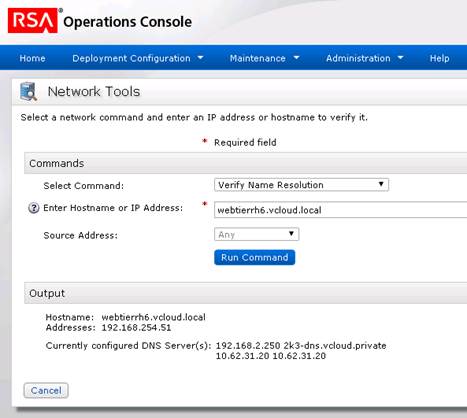
- Logon to the Red Hat Enterprise Linux operating system with the user account specified when installing the RSA Authentication Manager 8.1 Web Tier software (in these examples, rsaadmin is the Unix account for the Web Tier).
- Check that the hostname in /etc/sysconfig/network matches the output from the hostname command. For example,
[rsaadmin@webtierRH6 ~]$ hostname
webtierRH6.vcloud.local
[rsaadmin@webtierRH6 ~]$ cat /etc/sysconfig/network
NETWORKING=yes
HOSTNAME=webtierRH6.vcloud.local
[rsaadmin@webtierRH6 ~]$
- Check that port 7022 is open to the Authentication Manager instances using the command openssl s_client –connect <Authentication_Manager_hostname>:7022, substituting <Authentication_Manager_hostname> with the fully qualified hostname of the Authentication Manager instance.
Using the fully qualified hostnames of the Authentication Manager server and Web Tier with the openssl command verifies name resolution. Below is an example where a connection is made to port 7022 and a certificate is returned with the common name (CN) of the Authentication Manager instance:
[rsaadmin@webtierRH6 ~]# openssl s_client -connect am81p.vcloud.private:7022
CONNECTED(00000003)
depth=1 CN = RSA root CA for am81p.vcloud.private, serialNumber = 81e2fcac8ae3aa4427670e653f0e84214eb974f9e6810bac80a9c8b9fcf17091
verify error:num=19:self signed certificate in certificate chain
verify return:0

139939655591752:error:14094412:SSL routines:SSL3_READ_BYTES:sslv3 alert bad certificate:s3_pkt.c:1256:SSL alert number 42
139939655591752:error:140790E5:SSL routines:SSL23_WRITE:ssl handshake failure:s23_lib.c:177:
---
Certificate chain
0 s:/CN=am81p.vcloud.private/serialNumber=7df7b8d5f50e4dbf77c12bfae19172ed957c4f2e544c6553e65fc8733bf61b9f
   i:/CN=RSA root CA for am81p.vcloud.private/serialNumber=81e2fcac8ae3aa4427670e653f0e84214eb974f9e6810bac80a9c8b9fcf17091
1 s:/CN=RSA root CA for am81p.vcloud.private/serialNumber=81e2fcac8ae3aa4427670e653f0e84214eb974f9e6810bac80a9c8b9fcf17091
   i:/CN=RSA root CA for am81p.vcloud.private/serialNumber=81e2fcac8ae3aa4427670e653f0e84214eb974f9e6810bac80a9c8b9fcf17091
---
Server certificate
-----BEGIN CERTIFICATE-----
MIIDfjCCAmagAwIBAgIQizOPOB70ObvHBrpVJJ00eDANBgkqhkiG9w0BAQUFADB6
MS0wKwYDVQQDDCRSU0Egcm9vdCBDQSBmb3IgYW04MXAudmNsb3VkLnByaXZhdGUx
STBHBgNVBAUTQDgxZTJmY2FjOGFlM2FhNDQyNzY3MGU2NTNmMGU4NDIxNGViOTc0
ZjllNjgxMGJhYzgwYTljOGI5ZmNmMTcwOTEwHhcNMTUwOTAxMDcxMDUzWhcNMzUw
OTAyMDcxMDUzWjBqMR0wGwYDVQQDDBRhbTgxcC52Y2xvdWQucHJpdmF0ZTFJMEcG
A1UEBRNAN2RmN2I4ZDVmNTBlNGRiZjc3YzEyYmZhZTE5MTcyZWQ5NTdjNGYyZTU0
NGM2NTUzZTY1ZmM4NzMzYmY2MWI5ZjCCASIwDQYJKoZIhvcNAQEBBQADggEPADCC
AQoCggEBAOb+f36bczN7xRnkIXkjvq6SRsKPgFMHg24Lpp4MAe7DwLXjGR7jYaly
d1KKXfzUV+qXhiytixMVBFnTHuHO61aCSXCJeIPOeqvb4FifK+LKPTUEo3SBcaum
xf2fQr7wVTDRKu8LSZtvD7JPwf+eUU97duKV9i0RtyDzdN8qwAmJ42C+qJkhzWvE
OIUosDWq8iM6ERvg80kDHZ0VD15yhLJIJ58O3vVz7161G5Vks+uXP/OMxmkEG9Rj
dm0nc2ptmZ4LHnUMkeB3rGBAaOQmGm/6bhwqbbWuFfYdOPo7i5H+xAfV55yP0kFa
Z+P76ovcX+lPqskETTfXbJ84/UmEOtcCAwEAAaMQMA4wDAYDVR0TAQH/BAIwADAN
BgkqhkiG9w0BAQUFAAOCAQEAgZQ9hOrNx/C4Mq8F1t3x/VaTLHIjJCntDa/5oa6T
LzUz9PF5zsIFvIC8qi/WgZuDCIE+ztUj4+wBLohqB9JYabLYWUVMTk4EkgN3G9Em
o580rfLOacqM7JEZt2wGiea9S6FaWjJtDaRC8GWoU1M3iFWqm1EyrMc+i000wg8x
DhnyizHhncuIv5VVCxsezsAf1EuhQJszzV4hCDErM4O0dgQw85lex9m+y6xnUKBn
uP9NI1PZ0xTRmO0rCEVUFx1+SgynuEJLBN3z3JBRtQPzDS9NpCFacSdrNEKp2FCb
U9vGxSkLqosB/wGjSu0LV75sw3pSb8ycYJ4c1xYmYnbMsQ==
-----END CERTIFICATE-----
subject=/CN=am81p.vcloud.private/serialNumber=7df7b8d5f50e4dbf77c12bfae19172ed957c4f2e544c6553e65fc8733bf61b9f
issuer=/CN=RSA root CA for am81p.vcloud.private/serialNumber=81e2fcac8ae3aa4427670e653f0e84214eb974f9e6810bac80a9c8b9fcf17091
---
Acceptable client certificate CA names
/CN=RSA root CA for am81p.vcloud.private/serialNumber=81e2fcac8ae3aa4427670e653f0e84214eb974f9e6810bac80a9c8b9fcf17091
/CN=RSA root CA for am81p.vcloud.private/serialNumber=81e2fcac8ae3aa4427670e653f0e84214eb974f9e6810bac80a9c8b9fcf17091
/CN=RSA root CA for am81p.vcloud.private/serialNumber=81e2fcac8ae3aa4427670e653f0e84214eb974f9e6810bac80a9c8b9fcf17091
/CN=RSA root CA for am81p.vcloud.private/serialNumber=81e2fcac8ae3aa4427670e653f0e84214eb974f9e6810bac80a9c8b9fcf17091
/CN=RSA root CA for am81p.vcloud.private/serialNumber=81e2fcac8ae3aa4427670e653f0e84214eb974f9e6810bac80a9c8b9fcf17091
/CN=RSA root CA for am81p.vcloud.private/serialNumber=81e2fcac8ae3aa4427670e653f0e84214eb974f9e6810bac80a9c8b9fcf17091
/CN=RSA root CA for am81p.vcloud.private/serialNumber=81e2fcac8ae3aa4427670e653f0e84214eb974f9e6810bac80a9c8b9fcf17091
---
SSL handshake has read 2850 bytes and written 370 bytes
---
New, TLSv1/SSLv3, Cipher is AES256-SHA256
Server public key is 2048 bit
Secure Renegotiation IS supported
Compression: NONE
Expansion: NONE
SSL-Session:
    Protocol  : TLSv1.2
    Cipher    : AES256-SHA256
    Session-ID: 562D60E13C1C69BD4A7A4E0F6A7E72DD6BFBA15B5253412053534C4A20202020
    Session-ID-ctx:
    Master-Key: B81A873D380177C28C13970E1D5C8FEABC38C7597A276CF140A3673FA638D023F8DC782BFDB3F5F0A4B98E40C825436E
    Key-Arg   : None
    Krb5 Principal: None
    PSK identity: None
    PSK identity hint: None
    Start Time: 1445814472
    Timeout   : 300 (sec)
    Verify return code: 19 (self signed certificate in certificate chain)
---
[rsaadmin@webtierRH6 ~]#
- Check that port 443 is open to the Web Tier using the command openssl s_client –connect [wt_hostname]:443, (substitute [WT_hostname] with the fully qualified hostname of the Web Tier).
- The following is an example where port 443 is not available because the Web Tier services were not running:
[rsaadmin@webtierRH6 ~]# openssl s_client -connect webtierrh6.vcloud.local:443
socket: Connection refused
connect:errno=111
[rsaadmin@webtierRH6 ~]#
- Here is an example of a connection that can be made to port 443 and the common name (CN) of the certificate contains the virtual hostname:
[rsaadmin@webtierRH6 ~]# openssl s_client -connect webtierrh6.vcloud.local:443
socket: Connection refused
connect:errno=111
[rsaadmin@webtierRH6 ~]#
- Another example of a connection made to port 443 and the Common Name (CN) of the certificate contains the virtual hostname:
[rsaadmin@webtierRH6 ~]$ openssl s_client -connect webtierrh6.vcloud.local:443
CONNECTED(00000003)
depth=1 CN = RSA root CA for am81p.vcloud.private, serialNumber = 81e2fcac8ae3aa4427670e653f0e84214eb974f9e6810bac80a9c8b9fcf17091
verify error:num=19:self signed certificate in certificate chain
verify return:0
140662454237000:error:100AE081:elliptic curve routines:EC_GROUP_new_by_curve_name:unknown group:ec_curve.c:316:
140662454237000:error:1408D010:SSL routines:SSL3_GET_KEY_EXCHANGE:EC lib:s3_clnt.c:1641:
---
Certificate chain
0 s:/CN=selfservice.company.com/serialNumber=7da369177dd998d5034e0c7e05af2d1c2136daf0677e2b0d264142d4fb66fa05
   i:/CN=RSA root CA for am81p.vcloud.private/serialNumber=81e2fcac8ae3aa4427670e653f0e84214eb974f9e6810bac80a9c8b9fcf17091
1 s:/CN=RSA root CA for am81p.vcloud.private/serialNumber=81e2fcac8ae3aa4427670e653f0e84214eb974f9e6810bac80a9c8b9fcf17091
   i:/CN=RSA root CA for am81p.vcloud.private/serialNumber=81e2fcac8ae3aa4427670e653f0e84214eb974f9e6810bac80a9c8b9fcf17091
---
Server certificate
-----BEGIN CERTIFICATE-----
MIIDgTCCAmmgAwIBAgIQDQIWPYO12DxKxVMHGG2AdDANBgkqhkiG9w0BAQUFADB6
MS0wKwYDVQQDDCRSU0Egcm9vdCBDQSBmb3IgYW04MXAudmNsb3VkLnByaXZhdGUx
STBHBgNVBAUTQDgxZTJmY2FjOGFlM2FhNDQyNzY3MGU2NTNmMGU4NDIxNGViOTc0
ZjllNjgxMGJhYzgwYTljOGI5ZmNmMTcwOTEwHhcNMTUwOTA2MDQzNDE5WhcNMjUw
OTA3MDQzNDE5WjBtMSAwHgYDVQQDDBdzZWxmc2VydmljZS5jb21wYW55LmNvbTFJ
MEcGA1UEBRNAN2RhMzY5MTc3ZGQ5OThkNTAzNGUwYzdlMDVhZjJkMWMyMTM2ZGFm
MDY3N2UyYjBkMjY0MTQyZDRmYjY2ZmEwNTCCASIwDQYJKoZIhvcNAQEBBQADggEP
ADCCAQoCggEBAMThBYFh5OurINaldszXad8b2rMZxPmbiSv8wAyAzpBRUkMnmYt6
GUwZMqHMQrJag1rrZpJjiy0sI50H50q+WkIg9E1O64NSBu7OMX2CdkKrSSvcR8Kx
f4+FKg9FudvwZQD6F+c7h8gdWx3WnYM5ycnzeqEJGRL9Bk4b5Rvif+sPn/903tyK
k8sLC+QbNBXY0tUq/WQ6fj4HIhhmBzbJxNyye31f4NRo/KLSSCGiSu7EgkWDZiqU
PlDbJy90JiioUj8TXBnlyTM91AchzUAL3BUvKUOKmV/VZB2aWJ7LI+W1u/R+1wUS
HAEhwd8u4E3MQHeiUw4/eCmGPyK0ZWp53JUCAwEAAaMQMA4wDAYDVR0TAQH/BAIw
ADANBgkqhkiG9w0BAQUFAAOCAQEAdjkCdHDFhPpt8M0asHUqMoqpyr/SQhSgSiRB
JMmdHYi/YOy0GBu0boTHa5uy9qMoqK4ZXL1yppigPpP3gO9UBETtH0DU2rbY7Q32
ou+OhuQcPpiM8ymESm9wojICZjnXX2RTNOPOsyeNmJCi/3XVTAF5S/rb6+6HFN2s
UuPI7r8az/CgWkevJ9zH0bBriE+zX9B4ieWMm6izOhZHVCvpk0dJkMsiVXXj5bT6
RzlGzVI6k1cMPvg5S8S6DcQDlPgrTuzffLFmOV3vz8zk1b6pIZjufjV4SOFJeR/r
gQqXu7eTW2suaXn99SmMwO3dVBMmqsch1qRtKWKGtx8B2ONlVQ==
-----END CERTIFICATE-----
subject=/CN=selfservice.company.com/serialNumber=7da369177dd998d5034e0c7e05af2d1c2136daf0677e2b0d264142d4fb66fa05
issuer=/CN=RSA root CA for am81p.vcloud.private/serialNumber=81e2fcac8ae3aa4427670e653f0e84214eb974f9e6810bac80a9c8b9fcf17091
---
No client certificate CA names sent
---
SSL handshake has read 2343 bytes and written 0 bytes
---
New, (NONE), Cipher is (NONE)
Server public key is 2048 bit
Secure Renegotiation IS supported
Compression: NONE
Expansion: NONE
SSL-Session:
    Protocol  : TLSv1.2
    Cipher    : 0000
    Session-ID: 562D6B7D4A301DFE1DA88DB044A0A8F758E0ABAB5253412053534C4A20202020
    Session-ID-ctx:
    Master-Key:
    Key-Arg   : None
    Krb5 Principal: None
    PSK identity: None
    PSK identity hint: None
    Start Time: 1445817213
    Timeout   : 300 (sec)
    Verify return code: 19 (self signed certificate in certificate chain)
---
[rsaadmin@webtierRH6 ~]$
- Check the status of the RSA Web Tier Bootstrapper Server. By default, the Web Tier software is installed in /opt/RSASecurity/RSAAuthenticationManagerWebtier/. In the following steps this will be referred to as [WT_Home].
Check the status of the RSA Webtier Bootstrapper Server with the command [WT_Home]/webtierBootstrapper/server/rsaserv status. For example,
[rsaadmin@webtierRH6 ~]# /opt/RSASecurity/RSAAuthenticationManagerWebtier/webtierBootstrapper/server/rsaserv status
Running as rsaadmin...
RSA Webtier Bootstrapper Server                            [RUNNING]

[rsaadmin@webtierRH6 ~]#
- Should this service be shutdown, start the RSA Webtier Bootstrapper Server with the followingcommand:
[rsaadmin@webtierRH6 ~]# webtierBootstrapper/server/rsaserv start
- Should the RSA Webtier Bootstrapper Server fail to start then look into the [WT_Home]/ webtierBootstrapper/n.n.n.n.n/logs/WebtierBootstrapperServerWrapper.log file (where n.n.n.n.n is the version number relating to the version of web tier software (e. g., 8.1.1.2.0).
An example of a typical hostname lookup error is as follows:
INFO   | jvm 1    | main    | 2015/10/26 10:26:04 | ERROR: Failed to get local host name!
INFO   | jvm 1    | main    | 2015/10/26 10:26:04 |
INFO   | jvm 1    | main    | 2015/10/26 10:26:04 | WrapperSimpleApp: Encountered an error running main: java.lang.Error: Failure to initialize UniqueIDGenerator
INFO   | jvm 1    | main    | 2015/10/26 10:26:04 | java.lang.Error: Failure to initialize UniqueIDGenerator
INFO   | jvm 1    | main    | 2015/10/26 10:26:04 |     at com.rsa.ims.common.UniqueIDGenerator.<clinit>(UniqueIDGenerator.java:58)
INFO   | jvm 1    | main    | 2015/10/26 10:26:04 |     at com.rsa.ims.common.IMSGUID.<init>(IMSGUID.java:40)
INFO   | jvm 1    | main    | 2015/10/26 10:26:04 |     at com.rsa.ims.logging.BasicLogEventDetails.<init>(BasicLogEventDetails.java:119)
INFO   | jvm 1    | main    | 2015/10/26 10:26:04 |     at com.rsa.ims.logging.log4j.Log4jLoggerWrapper.log(Log4jLoggerWrapper.java:278)
INFO   | jvm 1    | main    | 2015/10/26 10:26:04 |     at com.rsa.ims.logging.log4j.Log4jLoggerWrapper.log(Log4jLoggerWrapper.java:255)
INFO   | jvm 1    | main    | 2015/10/26 10:26:04 |     at com.rsa.ims.logging.log4j.Log4jLoggerWrapper.log(Log4jLoggerWrapper.java:114)
INFO   | jvm 1    | main    | 2015/10/26 10:26:04 |     at com.rsa.ims.logging.trace.TraceLog.log(TraceLog.java:297)
INFO   | jvm 1    | main    | 2015/10/26 10:26:04 |     at com.rsa.ims.logging.trace.TraceLog.log(TraceLog.java:282)
INFO   | jvm 1    | main    | 2015/10/26 10:26:04 |     at com.rsa.tool.webtierbootstrapper.WebtierBootstrapper.start(WebtierBootstrapper.java:65)
INFO   | jvm 1    | main    | 2015/10/26 10:26:04 |     at com.rsa.tool.webtierbootstrapper.WebtierBootstrapper.main(WebtierBootstrapper.java:87)
INFO   | jvm 1    | main    | 2015/10/26 10:26:04 |     at sun.reflect.NativeMethodAccessorImpl.invoke0(Native Method)
INFO   | jvm 1    | main    | 2015/10/26 10:26:04 |     at sun.reflect.NativeMethodAccessorImpl.invoke(NativeMethodAccessorImpl.java:39)
INFO   | jvm 1    | main    | 2015/10/26 10:26:04 |     at sun.reflect.DelegatingMethodAccessorImpl.invoke(DelegatingMethodAccessorImpl.java:25)
INFO   | jvm 1    | main    | 2015/10/26 10:26:04 |     at java.lang.reflect.Method.invoke(Method.java:597)
INFO   | jvm 1    | main    | 2015/10/26 10:26:04 |     at org.tanukisoftware.wrapper.WrapperSimpleApp.run(WrapperSimpleApp.java:248)
INFO   | jvm 1    | main    | 2015/10/26 10:26:04 |     at java.lang.Thread.run(Thread.java:680)
INFO   | jvm 1    | main    | 2015/10/26 10:26:04 | Caused by: java.net.UnknownHostException: webtierRH6.vcloud.dmz: webtierRH6.vcloud.dmz
INFO   | jvm 1    | main    | 2015/10/26 10:26:04 |     at java.net.InetAddress.getLocalHost(InetAddress.java:1409)
INFO   | jvm 1    | main    | 2015/10/26 10:26:04 |     at com.rsa.ims.common.UniqueIDGenerator.init(UniqueIDGenerator.java:111)
INFO   | jvm 1    | main    | 2015/10/26 10:26:04 |     at com.rsa.ims.common.UniqueIDGenerator.<clinit>(UniqueIDGenerator.java:56)
INFO   | jvm 1    | main    | 2015/10/26 10:26:04 |     ... 15 more
STATUS | wrapper  | main    | 2015/10/26 10:26:06 | <-- Wrapper Stopped
- Check the status of the RSA Webtier Server By default the web tier software is installed into/opt/RSASecurity/RSAAuthenticationManagerWebtier/, referred to below as [WT_Home].
- Check the status of the RSA Webtier Bootstrapper Server with the command [wt_home]/server/rsaserv status. For example ,
[rsaadmin@webtierRH6 ~]# /opt/RSASecurity/RSAAuthenticationManagerWebtier/server/rsaserv start
Running as rsaadmin...
RSA Webtier Server                                         [RUNNING]

[rsaadmin@webtierRH6 ~]#
- The log files for this RSA Webtier Server are located in[WT_Home]/server/logs. The log files of interest will be AdminServer.log, AdminServerWrapper.log, imsConsoleTrace.log and rsaserv.log.n. Look at the AdminServer.log file first to check for any exceptions or errors should there be an issue starting the RSA Webtier Server.
- Use article 000017402 Enabling debug for troubleshooting an RSA Authentication Manager 8.x deployment to enable debug and determine what the RSA Web Tier Server is actually doing when tasks are passed to the Web Tier.



