Failed to generate QR Code error when trying to activate software token using QR code in RSA Authentication Manager 8.x Self-Service Console
Originally Published: 2015-10-29
Article Number
Applies To
RSA Product Set: SecurID
RSA Product/Service Type: Authentication Manager
RSA Version/Condition: 8.x
RSA Product/Service Type: Authentication Manager
RSA Version/Condition: 8.x
Issue
Failed to generate QR Code
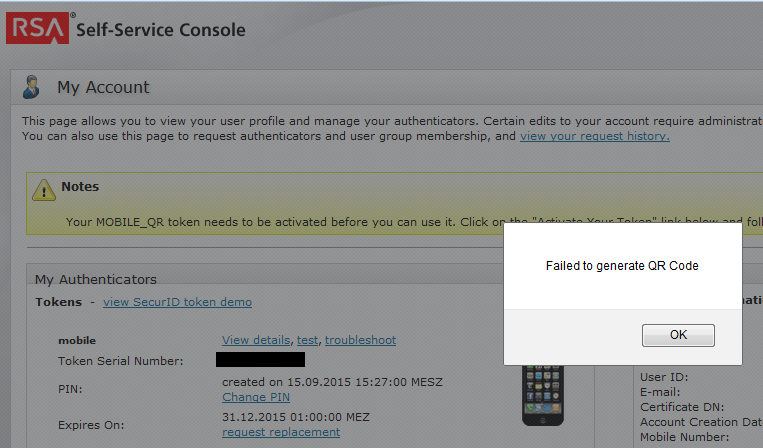
Cause
Workaround
- Log into the Authentication Manager Security Console.
- Navigate to Setup > System Settings.
- Under Authentication Settings, click on Tokens.
- Under Dynamic Seed Provisioning Configuration, enable Activation Code Expiration and set the number of days that the activation code can be used after the software token is distributed (the default is 7 days).
- Click Save.
- Redistribute the token.

Related Articles
AuthnContextValidator error when trying to authenticate using RSA Authentication Agent 2.0 for AD FS 92Number of Views Server certificate validation error when trying to authenticate using the RSA Authentication Agent 2.0 for AD FS 312Number of Views Error: 'Web-tier host certificate creation failed' when trying to create a web tier package 278Number of Views Passcode format error when trying to set a PIN thru a Cisco ASA 375Number of Views "Unsuccessful publish to identity routers" message when trying to publish changes in the RSA SecurID Access Cloud Administ… 134Number of Views
Trending Articles
RSA Authentication Manager 8.9 Release Notes (January 2026) RSA MFA Agent 2.5 for Microsoft Windows Installation and Administration Guide Quick Setup Guide - Passwordless Authentication in Windows MFA Agent for Active Directory Troubleshooting AFX Server issues in RSA Identity Governance & Lifecycle Downloading RSA Authentication Manager license files or RSA Software token seed records
Don't see what you're looking for?